










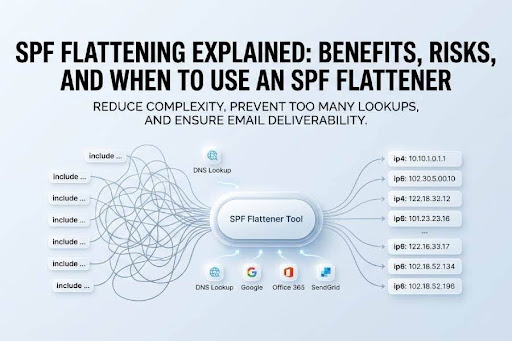
SPF flattening is the process of converting an SPF record that relies on external references—especially the include mechanism—into a flattened SPF record containing direct IP address values or IP ranges. Instead of asking receiving email servers to follow multiple include paths during SPF validation, the domain publishes a static IP list that represents the authorized senders.
A typical SPF record might authorize Google, Office 365, SendGrid, CRMs, Marketing Automation platforms, Customer Support tools, Order Fulfillment systems, and other third-party services. Each service often publishes its own SPF record, which may contain another include term, a, mx, IP address entries, IP ranges, or redirect terms. When those references stack up, SPF can exceed the DNS lookups limit.
That matters because SPF has a hard limit of 10 DNS-querying mechanisms. These include, a, mx, ptr, exists, and redirect terms. If a domain exceeds the DNS lookups limit, receivers may return a DNS Lookups Error, commonly seen as the Too Many Lookups Error. That can trigger SPF failure, SPF validation failure, and poor email deliverability.
For a Domain Owner managing Business Emails across Sales, Support, billing, and transactional systems, SPF flattening can help preserve SPF compliance and protect email sending reputation. However, it must be implemented carefully because a flattened SPF record can become stale if the underlying email services change their sending infrastructure.
How an SPF Flattener Works: Includes, DNS Lookups, and IP Expansion
An SPF flattener or SPF Flattening Tool resolves the DNS paths inside an SPF record and replaces external references with direct IP address entries. The tool evaluates each include term, follows nested SPF records, expands chained SPF records, and attempts to resolve IP addresses used by validated email sources.
From Include Mechanisms to IP Ranges
Consider an SPF configuration like this:
v=spf1 include:_spf.*google*.com include:*spf*.protection.outlook.com include:*sendgrid*.net -all
Each include can generate a DNS lookup. Google may reference additional IP ranges, Office 365 may publish several mechanisms, and SendGrid may maintain its own dynamic SPF structure. If these service chains include terms internally, the DNS lookup count rises quickly.
SPF record flattening tools inspect those includes, gather the resulting IP address and IP ranges, and publish them directly as a flattened SPF record:
v=spf1 ip4:203.0.113.0/24 ip4:198.51.100.0/24 ip6:2001:db8::/32 -all
This reduces the runtime DNS lookup count because receiving Email Servers no longer need to chase every included term during SPF validation.
The Role of a, mx, Include, and Redirect Terms
The a and mx mechanisms also count toward the DNS lookups limit. A mechanism tells receivers to check the domain’s A or AAAA records, while mx tells them to check mail exchanger hosts. Each a, each mx, each include, and redirect terms can create a DNS lookup.
Redirect terms are especially important because they replace evaluation of the current SPF record with another record. Like include, redirect terms can hide additional DNS lookup activity. If redirect terms point to another provider record, and that provider record contains more include, a, or mx mechanisms, the SPF mechanism limit may be exceeded.
What a Flattened SPF Record Actually Contains
A flattened SPF record usually contains ip4 and ip6 mechanisms, forming a static IP list. Some SPF Flattening Service providers also remove duplicate senders, identify overlapping IP ranges, and consolidate entries through SPF consolidation.
DNS Server Behavior During SPF Validation
During SPF validation, the receiving DNS Server retrieves the SPF record and checks whether the sending IP address is authorized. With a flattened SPF record, the DNS Server performs fewer follow-up queries, which reduces SPF overhead and helps avoid the DNS lookups limit.
SPF Macro Considerations
SPF macros and an SPF macro-based solution can provide a dynamic alternative to SPF flattening in some advanced environments. However, SPF macros require careful design and are often better suited to an Email Security Vendor or Software Developer with deep DNS and SPF expertise.
Key Benefits of SPF Flattening for Email Deliverability
SPF flattening is primarily used to improve email deliverability by preventing SPF failure caused by excessive DNS lookup chains. When configured correctly, a flattened SPF record gives receiving email servers a simpler authorization path.
Avoiding the DNS Lookups Limit
The biggest benefit is avoiding the DNS lookups limit. Organizations using Google, Office 365, SendGrid, CRMs, Marketing Automation, Customer Support systems, and other Third-party Services can hit the limit without realizing it. Tools like MxToolbox, dmarcduty.com, or another SPF tool can detect whether an SPF record is close to or over the limit.
By replacing each include term, a, mx, and redirect terms with IP address entries or IP ranges, SPF flattening lowers the number of active DNS lookup operations. This reduces the risk of the Too Many Lookups Error and improves SPF compliance.
Improving Reliability Across Business Emails
For domains sending Business Emails from Sales, Support, Order Fulfillment, billing, and automated platforms, consistent SPF validation is essential. A flattened SPF record helps receiving Email Servers quickly confirm Verified Senders and Validated Email Sources.
Better SPF alignment also supports broader authentication strategies involving DMARC and DKIM. SPF, DKIM, and DMARC work together to strengthen trust signals and protect a domain’s email sending reputation.
Reducing SPF Overhead
SPF flattening can reduce SPF overhead at message evaluation time. Instead of resolving nested SPF records and chained SPF records repeatedly, receivers compare the sending IP address against known IP ranges. This can improve processing reliability and reduce SPF validation failure caused by lookup complexity.
Dynamic SPF and Automatic Updates
Some providers offer Dynamic SPF or an automatic SPF solution that keeps a flattened SPF record updated when third-party senders change infrastructure. Dynamic SPF with automatic SPF monitoring is safer than manual SPF management because it reduces the chance of publishing an outdated SPF record.
Risks and Limitations: Stale IPs, Record Size, and Maintenance Challenges
SPF flattening is useful, but it is not risk-free. The main tradeoff is that the domain owner assumes responsibility for keeping the flattened SPF record synchronized with provider changes.
Stale IP Address Data
Third-party senders frequently change their IP ranges. Google, Office 365, SendGrid, and other email services may add or remove infrastructure without warning individual customers. If you flatten your SPF record once and never update it, the static IP list can become stale.
A stale or outdated SPF record can cause SPF failure when a legitimate sender uses a new IP address not listed in the flattened SPF record. This creates an email deliverability risk and may damage email sending reputation.
SPF Record Length Limitation
A flattened SPF record can become long. DNS TXT records have practical size constraints, and SPF has parsing limitations. If too many IP ranges are inserted, the domain may hit an SPF record length limitation.
In some cases, administrators try a split SPF record, but SPF splitting is often misunderstood. A domain cannot publish multiple independent SPF records for the same hostname; doing so creates errors. Instead, careful SPF consolidation is needed to reduce duplicate senders and overlapping IP ranges.
Maintenance Burden and Manual Errors
Manual SPF management creates a maintenance burden. Every time an email security vendor, CRM, Marketing Automation platform, or transactional email provider changes its sending network, the flattened SPF record may need to be regenerated as a re-flattened record.
Without automatic SPF monitoring, updating SPF record data becomes a recurring operational task. If neglected, SPF configuration becomes fragile and may produce SPF validation failure.
When to Use an SPF Flattener—and Best Practices for Safe Implementation
An SPF flattener is most useful when your domain is close to or exceeding the DNS lookups limit and you cannot remove required senders. It is especially relevant for organizations with many third-party senders, complex email services, and multiple departments sending mail.
Use SPF Flattening When Lookup Complexity Is the Main Problem
Use SPF flattening when your SPF record contains many include mechanisms, multiple a and mx mechanisms, nested SPF records, chained SPF records, or redirect terms. If an SPF tool such as MxToolbox reports a DNS Lookups Error or Too Many Lookups Error, flattening may be appropriate.
However, do not use SPF flattening as the first option if your SPF record contains obsolete services. First, remove duplicate senders, unused vendors, and redundant include entries. This SPF consolidation may solve the issue without needing a flattened SPF record.
Best Practices for Safe SPF Flattening
Before deploying a flattened SPF record, audit all email services used by Sales, Support, Customer Support, Order Fulfillment, CRMs, Marketing Automation, and other systems. Confirm which platforms are truly authorized to send mail for the domain.
Use a reputable SPF Flattening Service, SPF Record Flattening Tools, or an automatic SPF solution from an Email Security Vendor. Prefer services that support automatic SPF monitoring, alerting, and re-flattened record generation when provider IP ranges change.
Test the result with an SPF tool and verify that the SPF record stays under the DNS lookups limit. Also check the SPF record length limitation and confirm that the final policy supports your DMARC and DKIM strategy.
Alternatives to SPF Flattening
An alternative to SPF flattening is reducing senders, delegating subdomains, or using an SPF macro-based solution where appropriate. For example, a domain owner may place Marketing Automation on a dedicated subdomain while keeping corporate email on Office 365. This limits SPF configuration complexity and reduces dependency on one large flattened SPF record.
SPF flattening is powerful, but it should be treated as an operational process, not a one-time fix. The safest approach combines proper sender inventory, automatic updates, SPF compliance checks, and regular monitoring of every include term, IP address, IP ranges, a, mx, and redirect terms in the authorization chain.