








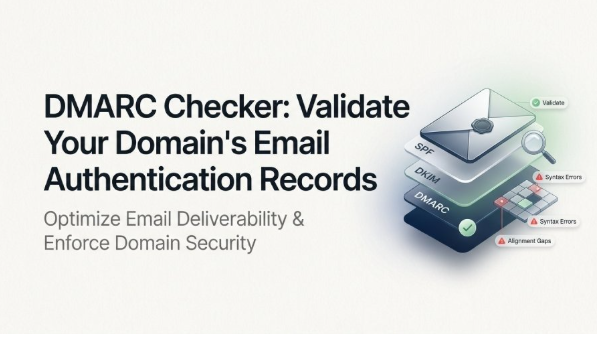
A DMARC checker is an essential tool for validating your domain’s email authentication records and identifying configuration issues that could affect email deliverability and security. By checking your DMARC, SPF, and DKIM settings, a DMARC checker helps confirm that authentication records are correctly configured, aligned, and enforcing the intended policy.
Regular DMARC validation can also reveal syntax errors, missing tags, reporting problems, and authentication failures, helping organizations reduce the risk of email spoofing and phishing while maintaining a stronger email security posture and protecting their domain reputation.
What a DMARC Checker Is and Why It Matters
A DMARC checker is a specialized tool designed to analyze and validate your domain’s DMARC record, ensuring your organization’s email authentication protocols are correctly deployed. DMARC, which stands for Domain-based Message Authentication, Reporting and Conformance, is an email authentication protocol that leverages SPF (Sender Policy Framework) and DKIM (DomainKeys Identified Mail) standards to protect your domain name from unauthorized use, commonly referred to as email spoofing or phishing.
Organizations use DMARC checkers and related DMARC diagnostic tools to perform in-depth dmarc validation and dmarc verification of their DNS records. These tools—such as those provided by entities like mxtoolbox, dmarcian, and EasyDMARC—help domain owners discover configuration issues, syntax errors, and gaps that can compromise email security or cause legitimate messages to be rejected or quarantined.
Implementing a legitimate DMARC policy is also a compliance requirement for many businesses, especially as ISPs and major email service providers like Google and Yahoo add greater scrutiny to sending domains. Notably, Google and Yahoo enforce sender requirements that make robust DMARC policies and reporting integral to ongoing deliverability and brand reputation.
How DMARC Works with SPF and DKIM
At the heart of DMARC authentication is the unification of existing standards—SPF and DKIM—under a single policy distributed via a DNS TXT record. This DMARC record instructs receiving servers how to validate email from your domain name and what actions to take if messages fail authentication checks.
SPF and DKIM: Foundational Protocols
SPF records specify which servers are permitted to send emails for a given domain, enabling the receiver to check the sender’s IP address against a list in the DNS record. DKIM records enable the cryptographic signing of outgoing messages, which the receiving server can then verify against the public key published in the sender’s DNS.
DMARC Authentication: Closing the Gaps
A DMARC record enhances email authentication by requiring that:
- Either SPF or DKIM (or both) must pass.
- The domain used in authentication aligns with the domain in the visible “From” header (known as dkim alignment and spf alignment).
This process is rooted in standards specified by RFC 7489, which defines precise standards for dmarc tag configuration, enforcement, and reporting.
A robust DMARC policy utilizes aggregate and forensic reporting (i.e., aggregate report/aggregate xml reports, forensic report) to monitor email streams and catch unauthorized use of your domain. Such oversight is critical for phishing prevention, spoofing protection, and maintaining email security.
Key DMARC Record Tags to Validate
Accurate dmarc record creation and ongoing validation are critical for achieving effective email authentication and DMARC compliance. A DMARC record checker or dmarc check tool will evaluate each part of your record, usually found at _dmarc.yourdomain.com as a TXT record.
Mandatory and Optional DMARC Tags
Key tags to validate for correct dmarc syntax and policy distribution include:
p (Policy Tag)
The p tag is required and defines the enforcement action—typically none, quarantine, or reject. A reject policy offers the highest level of protection, instructing receivers to discard non-compliant emails.
rua and ruf (Reporting Addresses)
- rua specifies where to send aggregate XML reports on DMARC activity (aggregate report).
- ruf provides an address for forensic reports, which contain sample data from individual failed messages (subject to privacy and policy restrictions).
sp (Subdomain Policy)
The sp tag is optional and allows specifying a separate DMARC policy for subdomains, enabling granular policy enforcement (subdomain policy).
adkim and aspf (Alignment Modes)
- adkim sets DKIM alignment (strict (s) or relaxed (r)).
- aspf defines SPF alignment.
pct (Percent Tag)
The pct tag determines what percentage of messages to subject to policy enforcement, enabling phased rollouts of stricter DMARC policies.
fo and rf (Failure Options and Report Format)
- fo defines which types of failures trigger forensic reporting.
- rf specifies the format for forensic reports (generally afrf).
ri (Reporting Interval)
The ri tag indicates the desired reporting interval, typically in seconds, for aggregate reports.
Each of these components should be checked for accuracy using a dmarc record checker or dmarc lookup tool to prevent misconfigurations.
Common DMARC Configuration Errors and Fixes
Incorrect DMARC DNS record setups can undermine email security efforts, disrupt deliverability, or expose the domain to unauthorized use. Here are some of the most frequent issues detected by DMARC diagnostic tools:
Syntax Errors in TXT Records
A malformed DMARC TXT record is the most basic—but critical—mistake. Misspellings, missing semicolons, and omitted tags typically cause validation failures. Use trusted dmarc check tools for immediate syntax verification and correction recommendations.
Missing or Incomplete Tags
Omitting required DMARC tags such as p (policy) or providing invalid data for rua/ruf reporting addresses will often lead to dmarc validation errors that may be flagged by automated tools.
Weak or Missing Enforcement
A DMARC policy set to none provides reporting only but doesn’t prevent spoofing or phishing attacks. For stronger security, move to quarantine or reject after a phased deployment supported by thorough dmarc record lookup and policy testing.
Misconfigured SPF or DKIM Records
DMARC compliance depends on functioning spf records and dkim records. If either is not properly aligned with your domain name (e.g., due to selector errors or wrong host entries), authentication failures will occur. Configuration analysis and record testing using combined DMARC, SPF, and DKIM checkers ensure these dependencies are satisfied.
Improper Reporting Setup
Incorrect email addresses in rua or ruf can block dmarc reports from reaching administrators, crippling monitoring efforts. Always validate these tags using a dmarc checker to confirm accurate email routing.
How to Use DMARC Checker Results to Improve Email Security
Interpreting the findings of your dmarc checker or dmarc diagnostic tool enables ongoing optimization of your organization’s DMARC authentication and reporting practices.
Analyzing DMARC Lookup and Validation Data
A robust dmarc record lookup details which DMARC tags are present, policy actions (none, quarantine, reject), policy distribution across subdomains, alignment settings, reporting intervals, and destination addresses for aggregate and forensic reports. Review these findings to confirm that all intended security controls are actively enforced and that no syntax error or misconfiguration exists.
Leveraging Aggregate and Forensic Reports
- Aggregate XML reports (rua) provide high-level overviews, revealing patterns of authorized and unauthorized use, and helping identify sources of spoofing attacks.
- Forensic reports (ruf) contain detailed message-level data to support in-depth investigation of authentication failures and attempted abuse.
This feedback cycle informs continuous improvement of your dmarc policy and record settings.
Incremental Policy Enforcement
Start with a none policy, analyze reports for legitimate and unauthorized mail sources, and then move to stricter actions (quarantine, reject) as you achieve complete dmarc compliance and alignment between SPF, DKIM, and DMARC.
Enhancing Brand Reputation and Deliverability
ISPs, MSPs, and major providers like Yahoo and Google reward domains with strong DMARC records by prioritizing inbox delivery. Regular dmarc record checker use, along with related tools for SPF and DKIM verification, is a best practice that safeguards brand reputation and optimizes overall email deliverability.
DMARC Checker Tools: Best Practices and Recommendations
Experts recommend using industry-leading DMARC check tools—such as MXToolbox, dmarcian, and EasyDMARC—for routine record testing and configuration analysis. These platforms offer automated DMARC record lookup, help monitor DMARC report, track aggregate and forensic reports, highlight compliance gaps, and assist in keeping your DNS records and security posture up to date, ensuring your organization meets current standards, including Google’s sender requirements and Yahoo’s sender requirements.
Consistent use of dmarc diagnostic tools and alignment with RFC 7489 and Public Tools Policy enables organizations to block phishing, increase trust, and preserve both security and brand reputation in a complex email threat landscape.